
How is a document photographed at an angle straightened?
How a program finds the corners of a photographed page, estimates its real proportions and pulls it straight. With Quorvyn Docyra as the example.
Last updated on · 5 min read
Why a photo does not give you a straight page
When you photograph an invoice with your phone, you rarely hold the camera exactly above the sheet. In the photo the page is therefore no longer a rectangle. The edge that was further from the camera looks shorter, lines run slightly towards each other, and the sheet is usually turned a little as well. Your eye does not mind. Text recognition reads such a page less well, though, and in an archive it looks untidy. Straightening turns it back into a page that looks as if it had been lying flat on a scanner.
A program needs two things for that. It has to know where the four corners of the sheet are in the photo, and it has to transform the area between them so that it becomes a rectangle with the right proportions. This guide shows how Quorvyn Docyra does both, using a test run on an invented invoice.
Finding the corners
If the page is so close to the camera that it fills the whole picture, Docyra simply takes the edges of the image. Otherwise a small neural network looks for the corners. It comes from the open source project DocAligner and, in its LCNet-100 variant, is just under 5 MB in size. The network sees a copy of the photo scaled down to 256 by 256 pixels and returns a heat map for each of the four corners. The map gives, for every point, how likely the corner is to lie there. In each map Docyra takes the largest connected area above a threshold and maps its centre back onto the original photo. The result is used only when all four maps yield a corner.
If the network does not find four corners, a classical method without a trained model takes over. It converts the photo to greyscale, smooths it and looks for edges and for light or dark areas. From their outlines it collects quadrilaterals and scores each one by its size, by how close its angles are to right angles, by how well its sides sit on real edges in the image and by how clearly the inside differs from the outside. The best quadrilateral is finally refined against the photo at full resolution.
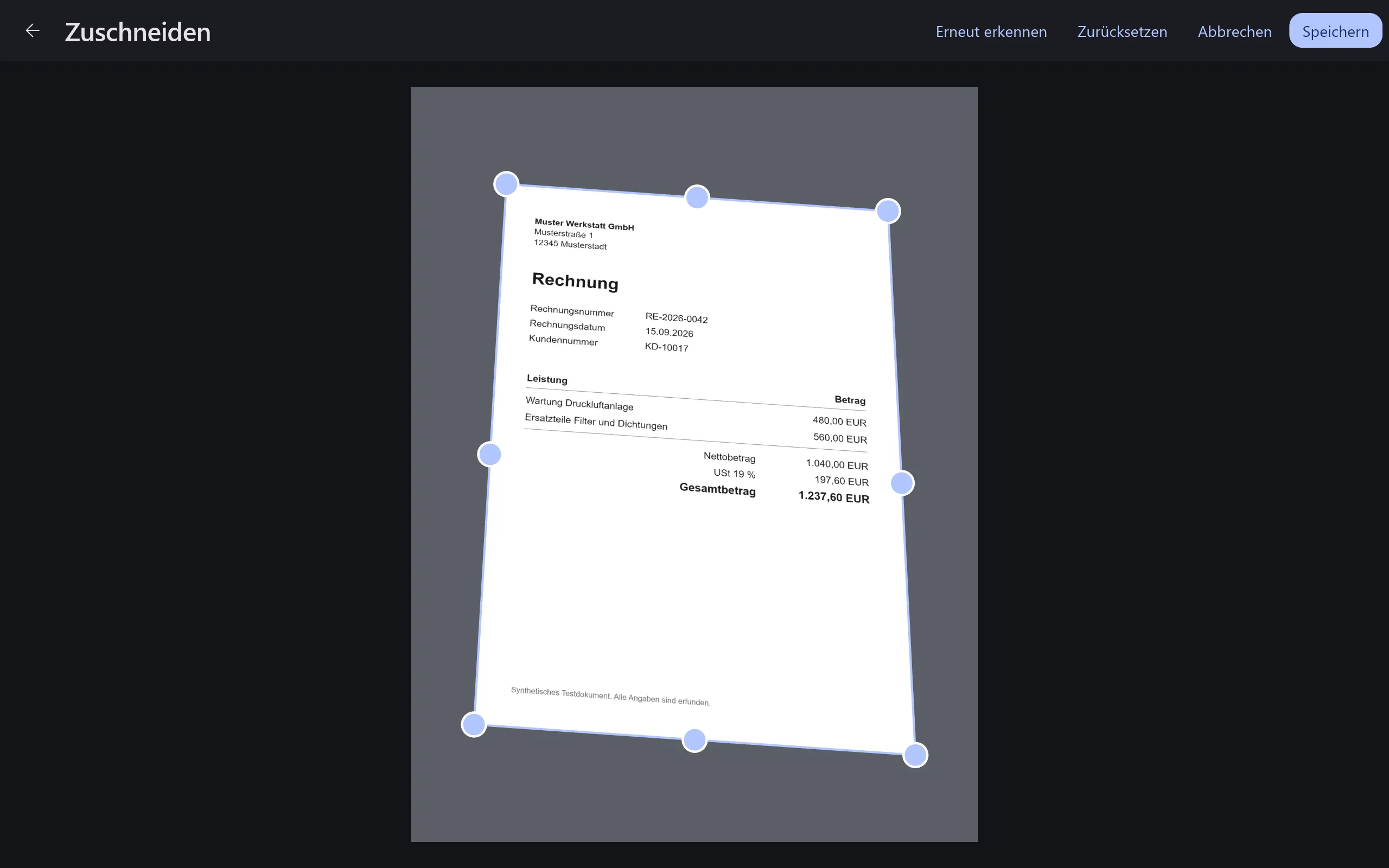
Checking the corners
Both methods only make a suggestion. On import Docyra straightens the page with it right away, and in the Crop view you can move each corner with the mouse or run the detection again. When you save there, the page is straightened once more with the new corners. If detection finds no corners at all, Docyra opens the view by itself with the edges of the image as corners, and you place them there. This step is deliberate. Otherwise a wrongly detected corner would cut off part of the document without asking.
Estimating the real proportions
Before the page is pulled straight, Docyra has to know how wide it really is in relation to its height. The edge lengths in the photo only tell you that when the page was shot almost head on. Seen at an angle, the far edge looks shorter and the ratio no longer holds. Docyra therefore estimates the ratio with the rectangle method of Zhang and He from their 2007 work on scanning whiteboards with a camera. It uses the fact that the four corners belong to a real rectangle and works out how the sheet lay in space. For that it needs the focal length of the camera. If the corners give a plausible value, that value is used, otherwise the one of a typical phone camera.
If the estimated ratio is within five percent of an A4 sheet, Docyra treats the page as A4 and fills the whole sheet with it. A till receipt, a US Letter page or a card keeps its own proportions instead and is scaled down and centred on a white A4 sheet. Every scanned page thus ends up in the same format without anything being squashed.
Pulling the page straight
The straightening itself needs a single mapping, which image processing calls a homography. It maps one plane onto another so that straight lines stay straight. It is defined by eight unknowns, and each of the four corner pairs from photo and target sheet provides two equations. The four corners therefore fix the mapping exactly. After that, every pixel of the new page takes its colour from the matching point in the photo. By default Docyra works at 200 dpi, which gives an A4 page of 1654 by 2339 pixels.
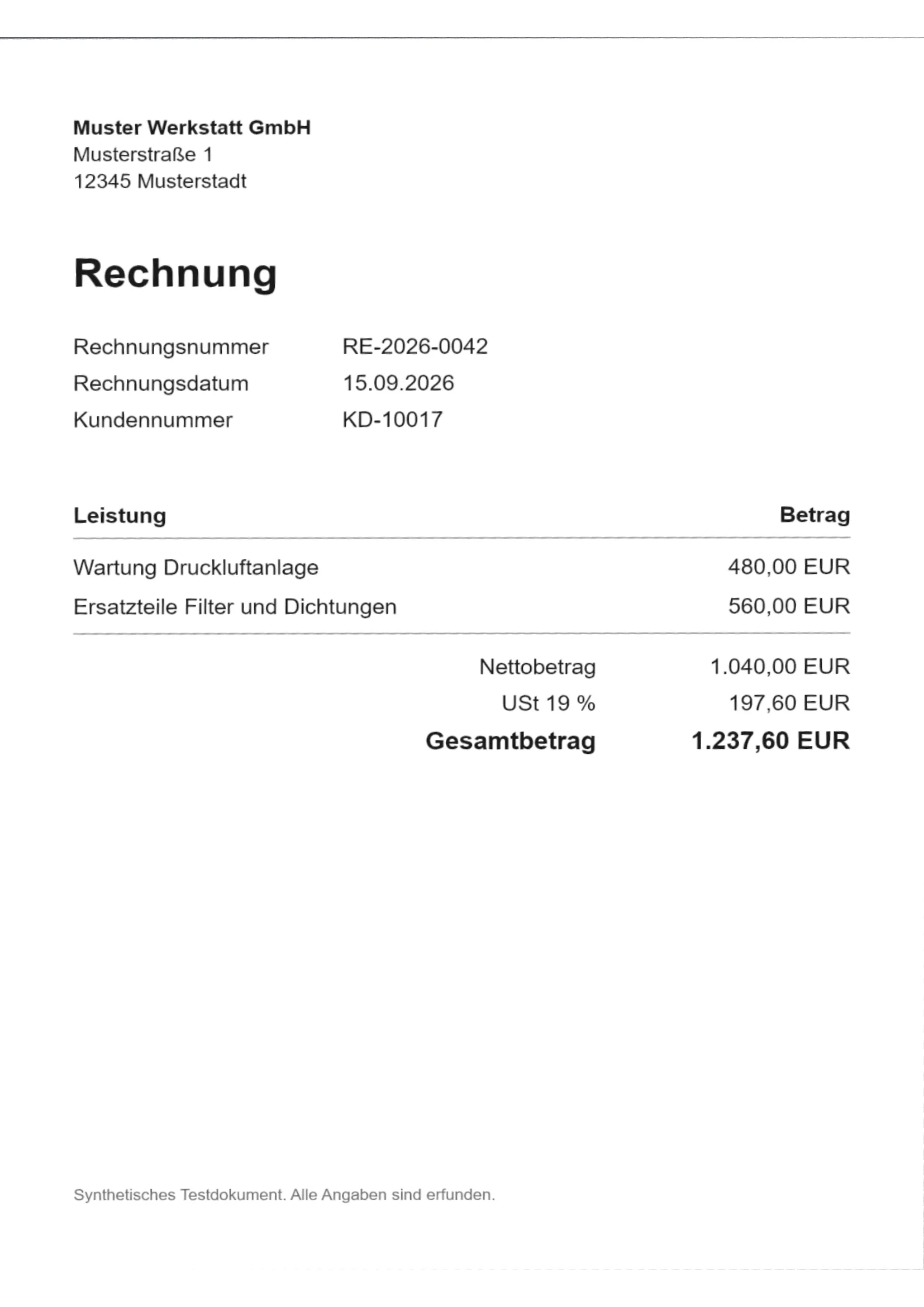
A thin grey line is visible along the top edge of the straightened invoice, and a very faint one on the right and at the bottom. The detected corners lie just outside the sheet there, so a strip of the background comes along. Such a margin does less harm than the opposite case, where a corner lies inside the sheet and text is cut off.
The test invoice is an A4 sheet, and still a white margin remains above and below it. In this run the estimated proportions were about six percent off A4 and so just outside the tolerance. Docyra therefore placed the page on the sheet with its estimated proportions and squashed nothing. This too is a single run and says nothing about how often the estimate is right on real photos.
What this example shows and what it does not
The photo in the figures is synthetic. The test run typeset the invented invoice on the computer and laid it on a grey background with a known distortion, slightly turned and tilted. It therefore lacks the blur, shadows, reflections and busy backgrounds a real photo brings. The figures show how the steps work together. They do not show how often the corners are right on real photos, and we give no figure for that here.
One limit applies whatever the original. A homography only maps a flat plane. A wavy page, an open book with a curved middle or a fold cannot be flattened with it. Such pages are turned straight, but they do not become flat.
Where to go from here
Edge detection and straightening are free in Quorvyn Docyra and run entirely on your computer. How the straightened page then becomes searchable text is described in How does OCR read an invoice?, and How does offline OCR work on Windows? gives a general introduction. Docyra is still in development and not yet available.