
How does OCR read an invoice?
How text recognition first finds lines of text and then reads them character by character. With model, test invoice and result from Quorvyn Docyra.
Last updated on · 4 min read
Two steps instead of one
Modern text recognition does not read a page in one go. It first looks for where on the page there is any text at all, and then reads each place it found on its own. Each step is done by its own neural network. There is a practical reason for this. An invoice is mostly white space, and a network that only has to read single lines can be smaller and more accurate than one that has to make sense of the whole page at once.
Quorvyn Docyra uses the PP-OCRv6-small model from the open source project PaddleOCR, in the ONNX version PaddlePaddle publishes itself. The network that finds lines has about 2.5 million parameters, the one that reads them about 5.2 million. Together the two files are about 30 MB. They are installed with the application and run on your computer, without any document leaving the device.
Finding lines
To find lines, Docyra scales the page down so that its longer side is at most 1600 pixels. A very small image is enlarged first. The first network gives, for every pixel, how likely it is to belong to text. The method behind it is called Differentiable Binarization. The areas above a threshold become boxes around connected pieces of text, usually a line or a single entry in a column. Boxes the network is too unsure about are dropped.
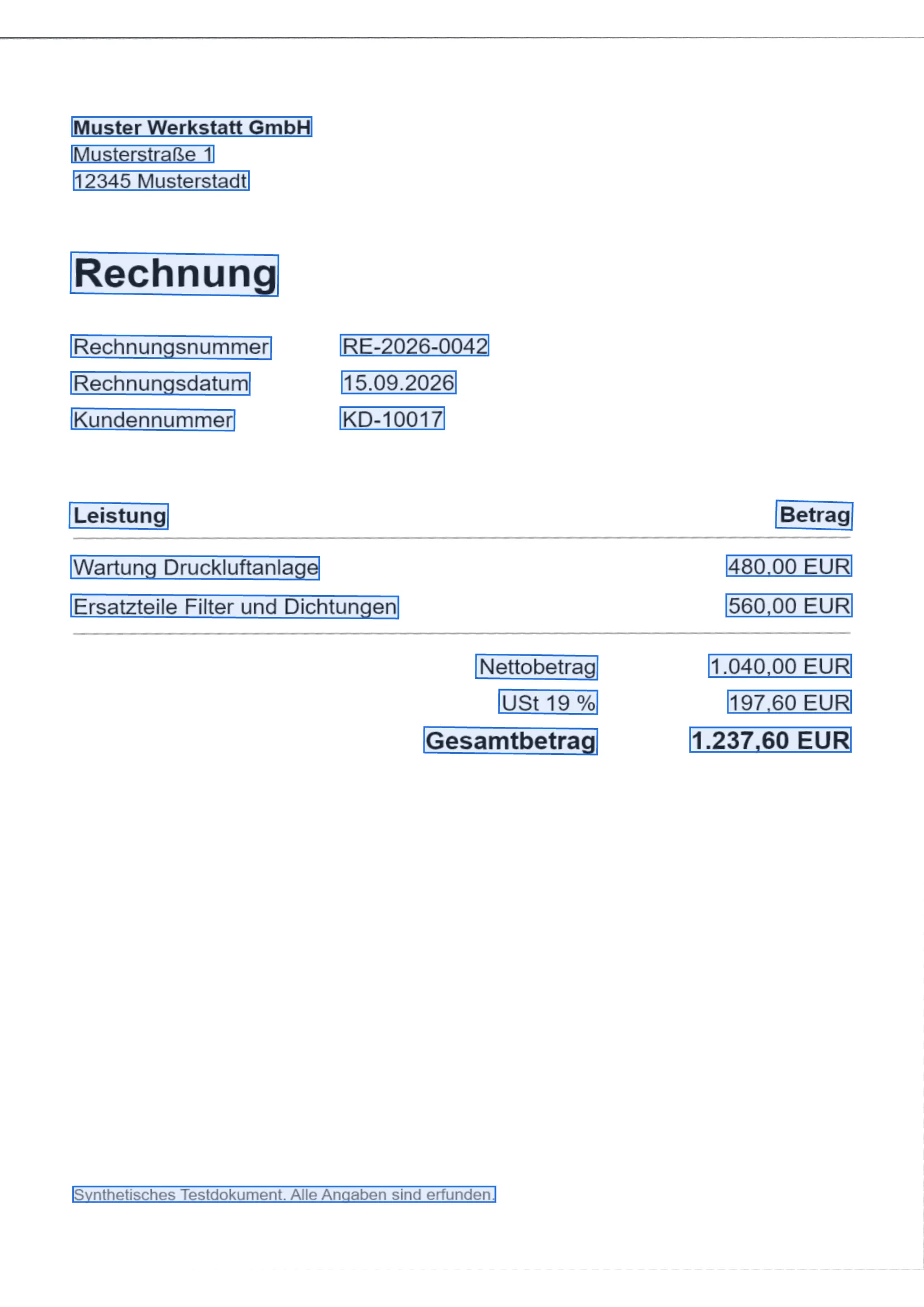
The figure shows that the boxes follow the layout of the invoice. The label for the invoice number and its value are two separate pieces, because a wide gap lies between them. That makes no difference to search, but it matters as soon as fields are to be matched with each other.
Reading characters
Each piece found is cut out of the page, brought to a uniform height and passed to the second network. It looks at the cut-out from left to right in narrow strips and estimates for each strip which character is there, or whether there is none at that point. Its character set has 18,708 entries. Because a wide character spans several strips, the same letter often appears several times in a row. A decoding step called CTC merges such repetitions and removes the empty strips. What remains is the text read from that piece.
Finally Docyra sorts the pieces into reading order and stores the text with the document as full text. That is how you find it later in search. When you export a PDF, the recognised text is placed as an invisible layer under the image, so that you can select and copy it in the PDF.
What the test run produced
For the figures we had Docyra read an invented German invoice, once as a cleanly typeset page and once as a synthetic photo that had been straightened first, as described in How is a document photographed at an angle straightened?. The test then checked whether the four expected values of the invoice appear in the recognised text, ignoring spaces and upper and lower case.
| Field | Expected | Typeset page | Straightened photo |
|---|---|---|---|
| Invoice number | RE-2026-0042 | RE-2026-0042 | RE-2026-0042 |
| Invoice date | 15.09.2026 | 15.09.2026 | 15.09.2026 |
| Customer no. | KD-10017 | KD-10017 | KD-10017 |
| Total | 1.237,60 EUR | 1.237,60 EUR | 1.237,60 EUR |
In both cases all four values were recognised character for character. The basis is a synthetic test document, one run per version, Docyra at commit b2bd60d. The comparison with the expected values was made by the test and not by the application.
What the result does not show
Four fields read correctly on one page show that the chain of finding lines, reading and straightening works together on a clear original. No accuracy can be derived from it. The invoice is set in an ordinary typeface, black on white and without interference, and the photo was also made on the computer and has no blur, no shadows and no paper noise. The run says nothing about real photos, poor copies, unusual typefaces or handwriting.
PaddlePaddle states a weighted average recognition accuracy of 81.3 percent for PP-OCRv6-small and 73.5 percent for the smaller tiny tier. That was the reason for choosing the larger tier. Both figures come from PaddlePaddle’s measurements on their own test data. We have not measured them ourselves, and they do not carry over to your documents.
That is why what the product page says applies here too. Recognised text is machine output and can be wrong. It makes a document findable, it is no binding transcript, and the original remains authoritative.
Where to go from here
Text recognition is part of Docyra Pro in Quorvyn Docyra. How does offline OCR work on Windows? gives a general introduction to the topic. Docyra is still in development and not yet available.
Read on
- IntroductionHow does offline OCR work on Windows?
- IntroductionHow do I photograph a document so it is easy to read?
- IntroductionHow do I digitise an ID or bank statement without the cloud?
- IntroductionHow do I organise my documents at home digitally?
- In depthHow is a document photographed at an angle straightened?